Tuesday, August 12, 2008

Difficult to find PCMCIA memory card?

I could not find a PCMCIA memory card. Where can I buy it?

You might find some PCMCIA ATA FLASH cards online. But they are usually relatively expensive.
Please use a CF (Compact Flash, up to 2GB) memory card with a PCMCIA adapter.
"Type I CF" to "Type II PCMCIA" adapter is the one you will need.

Please format the CF memory card in FAT16 with your PC. PM1D or PM5D does not support FAT32.

Thursday, August 7, 2008

Where is my MONO master fader? - LS9-16

Where is my MONO master fader?

On LS9-32, your MONO master fader is the fader 32 in the Master layer.
But, on LS9-16, there's no MONO master fader assigned in any layer as the factory default.

1. Please press the [SETUP] key repeatedly to access the USER SETUP screen.
2 Move the cursor to the CUSTOM FADER LAYER popup button in the screen, and press the [ENTER] key. The CUSTOM FADER LAYER popup window will appear.
3. Move the cursor to one of the faders and select "MONO" with the parameter wheel, then press the [ENTER] to set.
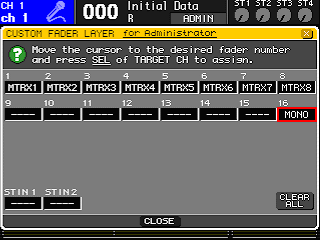

Master faders for Matrix are not assigned to any layer neither. If you would like to have them on the console, please assign them to the faders in the same way.

Wednesday, August 6, 2008

M7CL V1.15 and M7CL Editor V2.1.2 released

One more post today.
The updates for M7CL have been released. New firmware V1.15 and Editor software V2.1.2 was uploaded to Yamahaproaudio.com.
The firmware got a small improvement. The Editor got some bug fixes and improvement on its stability. Please check its release note on the download page.

The firmware V1.15 is still compatible with the previous version of Editor (V2.1.1). But we recommend you to upgrade both of them at one time for maximizing your system's performance and your better experience. To have more information about compatibility between different version of firmware and Editor software, please refer to the download page.

(I'm now listening to:
"Knights Of Cydonia" from "Black Holes and revelations" by Muse)

Quick overview of M7CL?

M7CL introduction video shot at InfoComm has been uploaded.

Any comment?

SIGNAL FLOW screen - PM5D

What is the first screen to do troubleshooting on my PM5D?

Open SIGNAL FLOW screen by pressing the VIEW key in OUTPUT or INPUT section.

Select a channel to check its status.