Showing posts with label PM1D tips. Show all posts

Thursday, August 28, 2008

+48V doesn't work?

"+48V" of the input channel is turned on but its phantom power is not provided to my condenser microphone.

Please make sure Phantom Master switch is turned on.
(PM1D)

Front panel of AI8
(PM5D-RH)

Rear panel of PM5D-RH
* PM5D doesn't have master switch

(DSP5D)

Mixer Setup screen

(M7CL)

Setup screen

(LS9)

System Setup screen

Tuesday, August 19, 2008

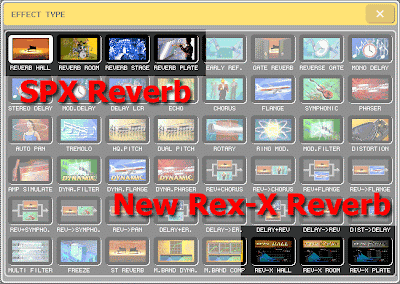
Try REV-X reverb

New REV-X algorithms are pre-installed to your PM1DV2, PM5D, PM5DV2, M7CL, LS9, and DM/0 VCM series. Yamaha add-on program is also available to some of other consoles to install Rev-X.
Try different characteristics of those reverb programs.


The following is from our "Add-on Effect" brochure:
"These reverb Add-on Effects employ the latest “REV-X” algorithms first introduced in Yamaha’s SPX2000 Professional Multi Effect Processor. The REV-X programs feature the richest reverberation and smoothest decay available, based on years of dedicated research and development.
REV-X Hall, REV-X Room, and REV-X Plate programs are provided, with new parameters such as room size and decay envelopes that offer unprecedented definition and finer nuance control. The REV-X Hall and REV-X Room programs have a very open sound, while REV-X Plate delivers a brighter tonality that is ideal for vocals. All models deliver dense, warm reverb that does not interfere with the natural timbre of the source."

Monday, August 18, 2008

Try REV-X reverb

New REV-X algorithms are available on your PM1DV2, PM5D, M7CL, LS9, DM/0 VCM series and some consoles with Yamaha add-on program installed.
Try different characteristics of those reverb programs.


The following is from our "Add-on Effect" brochure:
"These reverb Add-on Effects employ the latest “REV-X” algorithms first introduced in Yamaha’s SPX2000 Professional Multi Effect Processor. The REV-X programs feature the richest reverberation and smoothest decay available, based on years of dedicated research and development.
REV-X Hall, REV-X Room, and REV-X Plate programs are provided, with new parameters such as room size and decay envelopes that offer unprecedented definition and finer nuance control. The REV-X Hall and REV-X Room programs have a very open sound, while REV-X Plate delivers a brighter tonality that is ideal for vocals. All models deliver dense, warm reverb that does not interfere with the natural timbre of the source."

Tuesday, August 12, 2008

ExpressCard slot? PCMCIA slot?

Where is a PCMCIA slot on my computer?

PCMCIA slot
is now being replaced by ExpressCard slot and your computer might not have it.
If your computer does not have a PCMCIA slot and you are using a CF and a PCMCIA adapter for your PM1D/PM5D, please find USB CF Reader/Writer for your CF memory card.

Difficult to find PCMCIA memory card?

I could not find a PCMCIA memory card. Where can I buy it?

You might find some PCMCIA ATA FLASH cards online. But they are usually relatively expensive.
Please use a CF (Compact Flash, up to 2GB) memory card with a PCMCIA adapter.
"Type I CF" to "Type II PCMCIA" adapter is the one you will need.

Please format the CF memory card in FAT16 with your PC. PM1D or PM5D does not support FAT32.

Tuesday, July 29, 2008

Multi-band Compressor

Where is a multi-band compressor on my console?

PM1D (V1.6 or later), PM5D, M7CL, LS9, and DM/0 series has a program of multi-band dynamics in EFFECT unit (M.Band Dyna.).


PM5D, M7CL, and LS9 has multi-band compressor program also. This is little simplified version and easier to use. (M.Band Comp)


They are both have stereo input and stereo output.

Wednesday, July 2, 2008

Former version of Editor programs

When you get a rental console with old version of firmware, what will you do?
Will you update the console? Maybe not... Then, you will start looking for the correct version of Editor software to synchronize with the old firmware.

Ok, now you can download old version of the Editor software from YamahaProAudio.com.
In the Editor download page, there is a matching matrix for the firmware and the Editor.

Please refer to the link below.
1. Check the firmware version of the console
2. Check the Editor version which you have on your PC/Mac
3. Check the matching between them with the version history page: PM5D, DSP5D, M7CL, and LS9
4. If you need an old Editor program, download it from the links right.
Copying the matching matrix to your local disk would be a good idea.
For PM1D, it is a little simpler. Just use the same version of the PM1D Manager with the firmware and the former version of programs are available in the PM1D/PM1D V2 version history page.

Wednesday, June 25, 2008

Pan the input to the stereo Mixes

How do I pan the input signal to send to the stereo Mixes?

(PM1D, PM5D, M7CL, and LS9) At the Selected Channel area, Mix Send controls for the stereo Mixes are "Pan" (odd) and "Level" (even).

(PM5D V2) When "FLIP" mode is engaged to the input faders and "PAN" key at the encoder mode is pressed, the Channel Encoders are pan controls for the stereo Mixes from the input channels.

The function assigned to the controls in the mode: (Owner's Manual p.49)
Encoder -- Pan of the signal sent from channels (of the currently selected layer) to paired MIX buses (invalid if MIX channels are not paired)
ENCODER [ON] key -- Channel (currently selected layer) on/off
Fader -- Send level from channel (currently selected layer) to MIX bus
CH [ON] key -- On/off status of signal sent from channel (currently selected layer) to MIX bus

(DM/0): It will be set only with the screen.

Tuesday, June 24, 2008

Flattening PEQ

Is there a short-cut for flattening PEQ?

With the following short-cuts, gain parameter will be set to 0dB and its frequency and Q value will stay as is.

(PM1D) Please use a [FLAT] button in the EQ screen. (no hardware short-cut)

(PM5D) Press and hold down UPPER and LOWER keys.

(M7CL) Press both GAIN and Q knobs of a band that you'd like to flatten.

(LS9) Press both HIGH and LOW keys.

(DM2000 and 02r96) Press and hold down FREQUENCY/Q knob of a band that you'd like to flatten.
(DM1000 and 01v96) Press and hold down band key that you'd like to flatten.

Tuesday, May 27, 2008

Let your cursor free

If you are a big fan of navigating the PM5D or PM1D with the cursor keys, these tips may help you.

PM5D Owner's Manual p28:
"To move quickly to the outer edge of the current window or to a different window, hold down the [SHIFT] key and use the CURSOR keys. You will move from the scroll window in which the cursor is currently located, in the direction of the key you pressed."

In the Patch screen, the [DATA] encoder moves the cursor horizontally.
When you hold the [SHIFT] key and turn the encoder, the cursor is moved vertically.
Please put the mouse cursor outside of the patch matrix. If it is in the area, your red box cursor will be moved to a box with the mouse cursor after closing a confirmation pop-up.

Thursday, April 17, 2008

Key-in filter for a dynamics processor

Is there a key-in filter for a dynamics processor on a channel?

(PM1D) Yes, there is a HPF and a LPF for every Gate but no key-in filter for Comp. When you choose a KEY IN 1-4 you may select any post EQ audio signal from an input or output channel as the key-in source. At the time, the channel EQ can be a key-in filter—though the channel will be dedicated to the key-in.

(PM5D) Yes, there is one filter which you can select a type from HPF, LPF or BPF, for every Gate but no key-in filter for Comp. When you choose one of the MIX 21-24 output signals or one of adjacent eight channels' post EQ as a key-in source, the EQ on the source channel can be a key-in filter—though the channel will be dedicated to the key-in.

(M7CL, LS9) Yes, there is one filter which you can select a type from HPF, LPF or BPF, for every DYNAMICS 1 processor with GATE or DUCKING program but no key-in filter for any COMPRESSOR, EXPANDER, and DYNAMICS 2 processor. When you choose one of the MIX 13-16 output signals or one of the adjacent eight channels' post EQ as a key-in source, the EQ on the source channel can be a key-in filter—though the channel will be dedicated to the key-in.

(DM/0) No, there is not. When you choose one of MIX 1-12 output signals as a key-in source, the EQ on the MIX channel can be a key-in filter—though the MIX will be dedicated to the key-in. You can also choose one of the adjacent 12 channels as a key-in source; those signals are pre GATE -- pre EQ.

Wednesday, April 16, 2008

Scene Protection

How would I protect my Scene?

In the Scene window, there is a "PROTECT" option next to the scene name. Enabling this will protect a scene from being overwritten when attempting to store another scene onto it. However, it will be overwritten by loading a file from a storage device or deleted by initializing the console.

(PM5D V2 and LS9 only) You will be able to make a "READ ONLY" scene. This will not be overwritten by loading a file from a PCMCIA memory device or USB memory but will be overwritten by loading a scene from Studio Manager via USB or Ethernet port and/or initializing the console.
This "READ ONLY" setting can be selected only for consecutive scene numbers from scene number 000.

Tuesday, April 15, 2008

Copy send level settings

Can "send level settings from one input channel to all of the mixes" be copied to another channel?

Yes, it can.

(PM1D V1.6 or later, PM5D) Open the CH COPY screen in the INPUT/OUTPUT VIEW function. Select the "SEND" option from the parameters listed and then execute the copy.

(M7CL, LS9) Open the CH COPY screen in the CH JOB screen. Highlight the "WITH MIX SEND" option and then execute the copy.

(DM/0) In the PREFERENCE 2 screen, highlight AUX or ALL and then copy the channel by using the COPY and PASTE keys on the panel—you may also use USER DEFINED KEYS with those functions assigned.

Monday, April 14, 2008

Copy a channel with its name

How can I copy a channel with its name?

(PM1D, PM5D) Open the CH COPY screen in the INPUT/OUTPUT VIEW function. Highlight the NAME option and then execute the copy (PM5D: Only for input channels).

(M7CL, LS9, DM/0) Unfortunately there's no way to copy a channel with its name.

Friday, April 11, 2008

MONITOR and/or CUE master fader

Can I have a MONITOR and/or CUE master fader on the console?

(PM1D, M7CL) Yes, but you need external wiring. Please refer to "PM1D Short-Cut List" or "M7CL Short-cut List" (or refer to "Monitor Mix on M7CL").

(PM5D) Yes. With version 2 firmware, you can assign MONITOR or CUE master level control to STEREO A or B master fader.

(LS9) Yes. Monitor Master fader can be assigned to CUSTOM FADER layer. MONITOR ON MASTER FADER function is also available for User Defined Keys. If this is on, you can use the master fader to control the monitor level, and the ON key to switch the monitor output on/off.

Thursday, April 10, 2008

Grouping channels with DCA

Using DCAs, can a grouped signal be sent to the Matrix?

No, it cannot. By using DCAs, you can make a group of control for those faders. DCAs are not making an audio group but a group of level control.
These audio signals have to be mixed on a MIX bus in order to send a group of audio signals to any Matrix.

Wednesday, April 9, 2008

VARI to FIXED on one channel only

Can a MIX bus be changed from VARI to FIXED on one INPUT channel only?

(PM1D, PM5D, M7CL, LS9) No, it cannot. The bus setup is global for all input channels.

(DM/0) No, it cannot. AUX can be used as GROUP by changing its mode to FIXED. But, the mode is global for all input channels.
Note:
VARI (Variable) = AUX
FIXED = GROUP

Monday, April 7, 2008

Format a storage device on the console

Can I format a storage device on the console?

(PM1D, PM5D) No, you cannot. When you format the PCMCIA storage device from the PC for those consoles, use FAT16. (PM1D: FAT12 is also available.)

(M7CL, LS9) Yes, you can. The M7CL and the LS9 can handle FAT32, FAT16, or FAT12 file systems; if you format the storage device from the console it will be formatted as FAT16. Long file names are not supported. Operation is guaranteed only for USB flash memory that is no larger than 2 GB.
Note:
A partitioned USB flash memory is not supported.

(DM2000) Yes, you can. We strongly recommend that you format the storage device on the console.

Wednesday, April 2, 2008

Measurement in feet for setting a delay time

Can I see measurement in feet for setting a delay time?
Yes. Please select the "FEET" in the Delay Scale field of the Outport Setup screen (M7CL, LS9) or Input/Output Delay screen (PM5D, PM1D). You will see a value in feet under each Delay time knob.
Note:
The distance in feet, calculated as the speed of sound at an air temperature of 20°C (68°F) (1127.26 feet/s) x the delay time (seconds).

Tuesday, April 1, 2008

HPF for Output

Does the Output channel have a HPF?
No, but the Low frequency band on the EQ can be changed to HPF.
And the High frequency band also can be changed to LPF.